Managing Multiple Brands and Social Accounts as One Person
A workflow for the founder or creator who runs several brands: keep each one separate, give them a shared weekly rhythm, and automate the repeatable parts without blending voices.
You have a main business. Then a side project. Maybe a personal brand, a podcast, or a second shop you started "just to try something". Each one has an Instagram, maybe a LinkedIn profile, maybe a YouTube channel. That is six, eight, ten accounts, and one of you.
This is a different problem from running an agency. An agency has clients, teammates, approvals and invoices. You have none of that. You have a single calendar and a single brain, and you are the one most likely to post the wrong caption on the wrong account at 11pm. (If you do manage other people's brands, the agency workspaces guide is the better fit.)
Here is a workflow that keeps the brands separate while keeping your workload close to one brand's worth of effort.
Principle 1: separate the brands, share the routine
Two things should never mix: the accounts and audiences of each brand, and the voice. A craft shop and a B2B software tool should not sound alike.
Two things should absolutely be shared: your weekly routine and your tools. If each brand needs a different process, you will quit one of them within a month.
So the aim is one habit applied several times, not several habits.
Principle 2: one workspace per brand
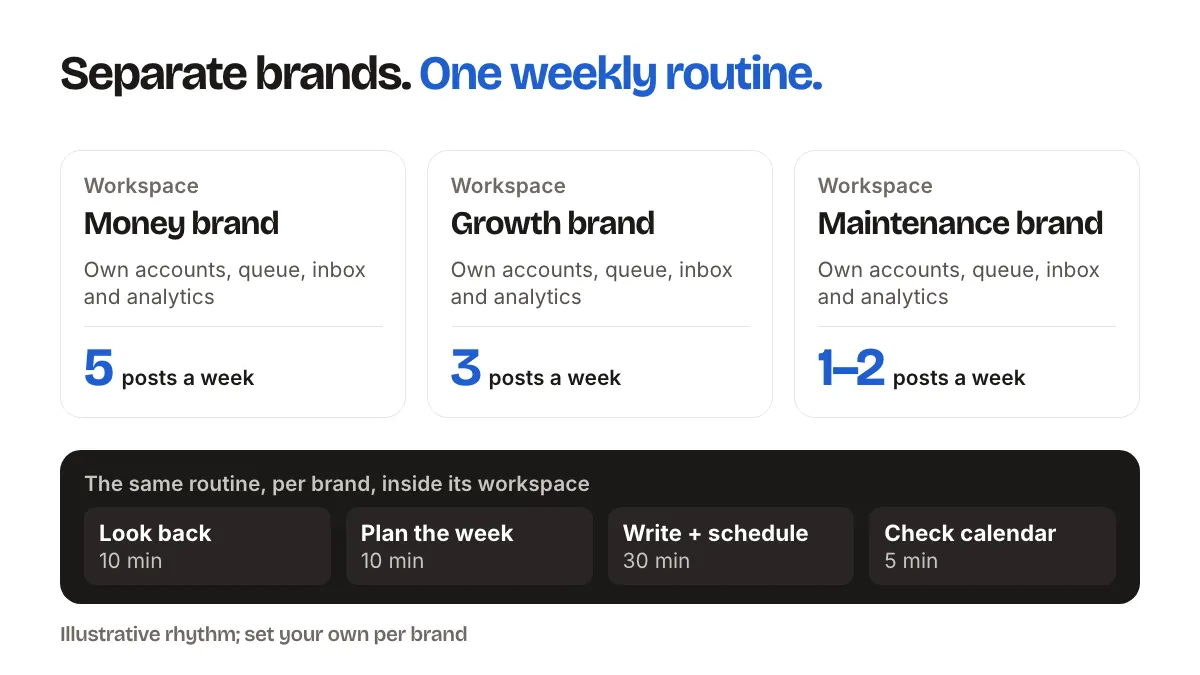
SocialPatra's workspace model is built so that one workspace holds one brand's world: its connected accounts, posts, queue, inbox and analytics. Using a workspace per brand means:
- You can't accidentally schedule the tool-company post on the craft-shop Instagram, because that account isn't connected to the workspace you are in.
- Each brand's analytics stay separate, so the numbers are not blended.
- Each brand's inbox shows only its own comments.
Name each workspace after the brand, plainly. When you switch between four of them on a busy morning, clear names prevent mistakes. How many workspaces your plan includes is listed on the pricing page.
Principle 3: give each brand a job
Not every account deserves equal attention. Decide, once, what each brand is for:
- The money brand. Gets the most careful posts and the quickest replies.
- The growth brand. Gets consistent posting and experiments.
- The maintenance brand. Stays alive with a light, steady stream so the account does not go dormant.
Write it down. Then set different rhythms to match: perhaps five posts a week for the money brand, three for the growth brand, one or two for the maintenance brand. A uniform schedule across everything is the fastest route to burnout.
The weekly rhythm (about two to three hours total)
Do this on the same day every week, one brand at a time, inside that brand's workspace.
1. Look back (10 minutes per brand). Open the analytics. Which post did best? Which got nothing? Write one sentence of what you will do more or less of. Post performance across platforms shows what you can see.
2. Plan the week (10 minutes per brand). Pick your topics. Two or three per brand is plenty.
3. Write and schedule (30 minutes per brand). Draft in the composer, choose the brand's accounts, and let time slots suggest times. Set slots once per account and each later session gets faster. Save anything unfinished as a draft.
4. Check the calendar (5 minutes). Look at the calendar view across the week for gaps and pile-ups.
5. Reply (10 minutes per brand, daily). Handle comments in the social inbox. This is the part not to automate.
The pattern is: batch the creating, schedule the delivery, and keep the conversation live.
What to automate per brand
Different brands benefit from different automation. Match the tool to the brand, not the other way round.
- A product or shop brand: Autopilot builds a steady stream of product posts so the account does not go quiet between launches.
- A blog or news-style brand: RSS automation turns new articles from a feed into posts.
- A planning-heavy brand: plan in a spreadsheet and use bulk CSV import to schedule the month in one upload.
- A brand where wording is the bottleneck: use the AI content generator for a first draft, then edit it in the brand's voice.
Start with one automation on one brand. When it runs smoothly for a few weeks, add the next. Stacking several at once makes problems hard to trace.
Reusing content without repeating yourself
Running many brands tempts you to reuse everything everywhere. Resist, mostly.
Safe to reuse: raw material. A lesson you learned can become a LinkedIn post for the software brand and a story for the personal brand, written differently each time.
Not safe to reuse: finished posts. The same caption on two brands' accounts looks lazy, and followers who follow both will notice.
A decent rule: reuse the idea, never the wording.
Avoiding the classic mistakes
- Posting to the wrong account. Working one workspace at a time prevents most of this. Check the account selector before you hit schedule.
- Treating every account the same. Different brands, different jobs.
- Scheduling too far ahead. Months of content cannot react to news. Two to four weeks is enough for most brands.
- Automating the replies. Let the software do the clock-watching, not the relationship. More mistakes to avoid are in the common automation mistakes.
How to know it is working
Don't compare brands by follower count alone. For each brand, define one number that matters: email signups, shop visits, demo requests, podcast downloads. Check it monthly. If a brand has not moved that number in a quarter, either change what you post or reduce the effort you give it. Having permission to run a brand lightly, or retire it, is one of the main benefits of tracking this at all. The metrics that matter and ROI of time saved guides help you pick the right ones.
FAQ
Should each brand have its own workspace?
If the brands have different audiences, accounts and voices, yes. A workspace per brand keeps accounts, queue, inbox and analytics separate and makes cross-posting mistakes much harder.
How is this different from agency workspaces?
The model is the same, but the use is not. Agencies add teammates, roles and client handoffs. A solo owner mostly wants separation and a single repeatable routine.
How much time should multiple brands take each week?
It depends on the brand and your goals. A rough planning figure from the routine above is about an hour per active brand per week, with less for a maintenance brand. Adjust it to your own results.
Can I use the same post for all my brands?
You can, but you should not. Reuse ideas, not wording. Each brand's audience expects its own voice.
Ready to give each brand its own space and a routine you can keep? Pick a plan.
Running several brands from one login is the job of a social media management tool with separate workspaces.