Instagram post scheduler
An Instagram post scheduler lets you prepare a photo, reel, carousel or story ahead of time and publish it at the date and time you pick; SocialPatra does this for Instagram business accounts.
Last verified
Plan: Free and up
You write the caption, add the media and choose a time. SocialPatra holds the post and publishes it to your Instagram account when that time arrives.
You can send the same post to your other connected accounts at the same time, or write a separate caption for Instagram.
Which Instagram account you need
SocialPatra connects Instagram business accounts. A personal Instagram profile cannot be connected.
The business account must be linked to a Facebook Page. SocialPatra looks for Instagram accounts through the Facebook Pages you manage, so an account that is not linked to a Page will not appear in the list.
How to connect Instagram
- Start the connection. In your workspace, choose to connect Instagram. You are sent to the Facebook login and permission dialog, because Instagram business accounts are reached through Facebook.
- Approve the permissions. SocialPatra asks to read your Instagram account basics, publish content for you, list your Facebook Pages and subscribe your Page to Instagram notifications.
- Choose the account. SocialPatra lists the Instagram accounts linked to your Pages. Pick the ones you want to publish to.
- Schedule your first post. Open the composer, select the Instagram account, add media and a caption, and set the date and time.
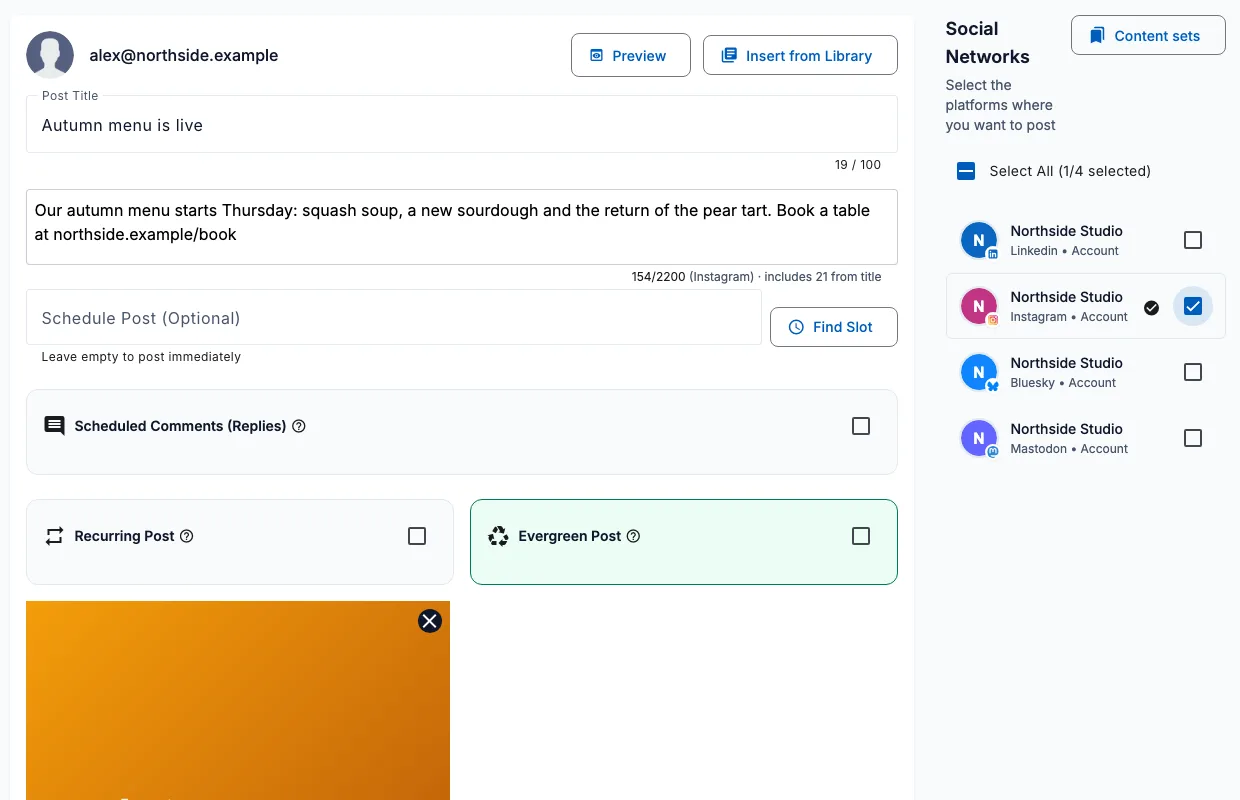
Schedule Instagram posts, reels, carousels and stories
| Post type | Media | Notes |
|---|---|---|
| Photo post | One image (JPG or PNG) | Published to your feed. |
| Reel | One video (MP4 or MOV) | A single video is published as a reel. |
| Carousel | 2 to 10 images | Published as one swipeable post. |
| Story | One image or video | Stories disappear after 24 hours, as on Instagram. |
Every Instagram post needs at least one image or video. A text-only post cannot be scheduled to Instagram.
Instagram limits SocialPatra checks for you
The composer and the publishing step check your post against these limits, so you find out before the scheduled time and not after.
| Limit | Value |
|---|---|
| Caption length | 2,200 characters |
| Hashtags per post | 5 |
| Media items per post | 10 |
| Videos per post | 1 |
| File size | Images up to 8 MB, videos up to 100 MB |
| File types | JPG, JPEG and PNG images; MP4 and MOV videos |
Collaborators, first comment and edits
- Add up to 3 collaborators on photos, reels and carousels.
- Choose whether a reel is also shown in your feed.
- Add a first comment that posts right after your main post, for example to hold extra hashtags.
Instagram does not allow a published post to be edited through its publishing API, so check the caption and media before the scheduled time. Change a scheduled post in SocialPatra while it is still waiting.
Comments from your Instagram posts
Comments on your Instagram posts can arrive in the SocialPatra inbox, so you can read them next to your other accounts. This needs the comments permission, which you can grant when you connect or later.
If an Instagram post does not publish
- If the Instagram account was unlinked from its Facebook Page, or is disconnected or suspended, SocialPatra reports it and asks you to check Instagram and reconnect.
- If the caption is over the limit, you get a clear message to shorten it.
How to disconnect Instagram
- Open your connected accounts. Go to the Connections page of your workspace.
- Remove the account. Choose Remove on the account and confirm. Only the workspace owner and admins see this button.
- Reconnect later if you need to. Removing an account is permanent. To post to it again you connect it again from the start.
Frequently asked questions
Can I schedule Instagram posts with SocialPatra?
Yes. You can schedule photo posts, reels, carousels and stories to a connected Instagram business account and SocialPatra publishes them at the time you set.
Do I need a business account to schedule Instagram posts?
Yes. The account must be an Instagram business account linked to a Facebook Page. A personal profile cannot be connected.
Can I schedule Instagram reels and carousels?
Yes. A single video is published as a reel, and a carousel can hold 2 to 10 images.
How long can an Instagram caption be?
A caption can be up to 2,200 characters, and Instagram allows at most 5 hashtags per post.
Can I post to Instagram without any image or video?
No. Every Instagram post needs at least one image or video.
Which types of Instagram post can SocialPatra schedule?
SocialPatra can schedule single images, a single video published as a reel, carousels of 2 to 10 images, and stories. Every post needs at least one image or video, and the caption can be up to 2,200 characters.
Try it on your own accounts
No card needed to start.