Social media manager software
Social media manager software is the set of tools a social media manager works in every day: a content calendar, a composer, a review step, and a way to keep each client or brand separate.
Last verified
Plan: Free and up
If you manage social media for a living, your real problem is rarely creativity. It is juggling: four brands, six networks, a client who answers on Thursday, and a calendar that lives half in a spreadsheet and half in your head.
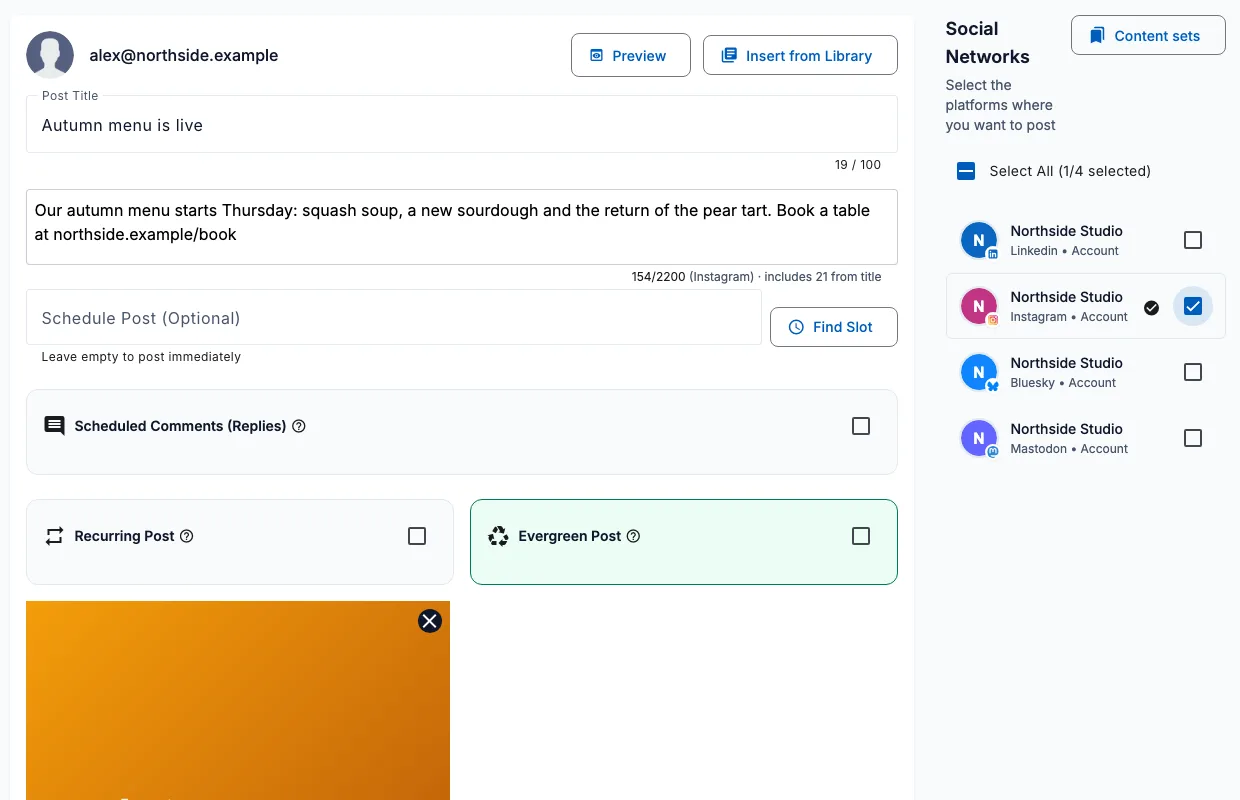
SocialPatra is social media manager software built around that juggling. One workspace per brand keeps accounts and drafts apart. One composer writes for every platform. An approval step collects sign-off without chasing it in chat, and automation handles the posts that do not need you.
This page is for the person doing the managing: what the software does at each stage of the job, how it works if you run one brand or twenty, and what to look for before you commit.
Where manager software saves the most time
A social media manager’s week breaks into a handful of recurring tasks. Software earns its place by taking the mechanical part out of each one and leaving the judgment to you.
| Task | In SocialPatra | Read more |
|---|---|---|
| Planning the calendar | A monthly calendar where scheduled posts sit on their day and move by dragging. | Social media scheduling |
| Writing first drafts | AI Studio turns an idea, text or a link into an editable draft for each account, in your brand voice. | AI content |
| Loading a content plan | Upload a CSV, see every error before anything is created, then schedule the valid rows. | Bulk scheduling |
| Getting client sign-off | Hold posts as drafts until a reviewer approves, or share a preview link of a post with a client. | Approval workflow |
| Keeping evergreen content moving | Recurring posts repeat daily, weekly or monthly, and evergreen rotation cycles through a library. | Recurring posts |
| Sharing new articles | RSS auto-posting turns new feed items into drafts or live posts. | RSS auto-posting |
| Reporting | Reach and engagement analytics across connected accounts on paid plans. | Plans and pricing |
How to set up a brand or client in SocialPatra
- Create a workspace for the brand. Each brand or client gets a workspace of its own, so accounts, posts and drafts never mix between them.
- Connect the accounts. Connect the brand’s accounts from the 18 supported platforms. If a client should authorize their own accounts, send them a connect link instead.
- Invite the people who need access. Invite teammates as admin, member or viewer, and invite a client as an approver if they should sign off on posts.
- Decide who needs approval. Turn approval on for the whole workspace or for specific team members. Owners and admins publish directly, so a trusted lead is never blocked.
- Schedule the first week. Write the posts, choose the accounts and times, and watch them appear on the calendar.
Solo manager, in-house team or agency
Running one brand alone? The Free plan covers core scheduling for the owner, and you can move to a paid plan when you add teammates or accounts. The composer, calendar and automation work the same on every plan.
On an in-house team, give each person the narrowest role that lets them do their job. Members write and schedule, admins run the workspace, viewers follow along, and the approver role signs off on posts without being able to edit your calendar.
At an agency, each client is a workspace. A client without an account connects through a link, and a client who already has one can link you to their own workspace and set what you may do. You choose their access level, and either you or the client pays.
| If you are | Start here |
|---|---|
| An agency managing many clients | Social media management for agencies |
| A team that needs roles and sign-off | Social media team collaboration tool |
| A developer or technical team | Developer content teams |
| A creator with a following | Creator program |
AI that drafts, and an assistant you can connect
AI is available on every plan. The Free plan has a small monthly allowance and branded output, and the paid plans add more writing and image credits. Treat every draft as a first pass: read it, edit it, and publish it only when it sounds like the brand.
The built-in assistant is a chat you can ask to draft, rewrite or plan a week of content. If you already work in an AI assistant such as Claude, the hosted MCP server on paid plans lets it schedule and report on posts in the workspace after you approve what it may do.
What a social media manager does, and what software takes over
A social media manager plans content, writes or commissions it, publishes it, keeps the community talking and reports on results. Most of the week goes to the repeatable parts, which is where software helps.
| Task | In SocialPatra |
|---|---|
| Planning the content calendar | A shared monthly calendar with drag-to-reschedule |
| Writing first drafts | AI Studio drafts per account, always editable |
| Getting sign-off from a client or boss | Approval workflow with notifications |
| Publishing across networks | One post to every account you tick, 18 platforms |
| Running several brands | One workspace per client |
| Repetitive posting | Recurring posts, RSS and bulk upload |
Software does not replace the manager. It removes the copy-paste so the manager has time for strategy, creative and conversation.
Social media manager software for a small business
If you are the owner and the social media manager, you need less ceremony and a low starting cost. The free plan covers core scheduling and needs no credit card, so you can connect an account and schedule a week of posts before deciding on a paid plan. Add AI drafts, recurring posts and an RSS feed from your blog as the routine settles. The pricing page shows what each plan includes.
Every platform in one place
Clients rarely live on one network. SocialPatra publishes to 18 live platforms, so a brand’s Instagram, LinkedIn, blog and Discord community can sit on one calendar.
| Platform | Type |
|---|---|
| Social network | |
| Social network | |
| Social network | |
| X (Twitter) | Social network |
| Threads | Social network |
| Bluesky | Social network |
| Mastodon | Social network |
| Social network and community | |
| YouTube | Video |
| Visual discovery | |
| Tumblr | Blogging |
| Medium | Blogging |
| Dev.to | Developer blogging |
| Hashnode | Developer blogging |
| WordPress | Blogging |
| Discord | Community and messaging |
| Slack | Community and messaging |
| Telegram | Community and messaging |
What to look for in social media manager software
- Separation between clients. A workspace per brand, with roles and approvals kept inside it, prevents the wrong post reaching the wrong audience.
- A realistic approval flow. Sign-off should happen inside the tool, with notifications, not in a chat thread.
- Pricing that follows your accounts. Calculate the monthly total for the accounts you will really connect.
- Bulk and automation. A content plan in a spreadsheet should become scheduled posts without retyping.
- A way to start free. You should be able to connect a real account and schedule a post before paying.
SocialPatra prices a workspace as a base plan plus a monthly price for each extra account. The pricing page shows the numbers for your country.
Frequently asked questions
What is social media manager software?
It is the software a social media manager uses to plan, write, schedule, review and report on posts across several accounts. SocialPatra combines a composer, a shared calendar, AI drafting, approvals and separate client workspaces.
Is SocialPatra for freelancers and agencies?
Yes. A freelancer can start on the free plan with one workspace. Agencies create one workspace per client, and Professional and Business have no limit on the number of workspaces.
How do I get client approval on posts?
Turn on approval for the workspace, or invite the client as an approver. Posts wait as drafts, the reviewer is notified in the app and by email, and only an approved post is scheduled.
Do my clients need a SocialPatra account?
Not for you to manage their accounts. You can send a connect link and they authorize their own accounts on each platform’s screen. A client who wants to sign off on posts is invited as an approver.
Which platforms can I manage?
SocialPatra publishes to 18 live platforms, including Instagram, Facebook, LinkedIn, X, Threads, YouTube, Pinterest, Bluesky, Mastodon, Reddit, Medium, WordPress, Discord, Slack and Telegram.
Is there free social media manager software?
SocialPatra has a free plan with core scheduling and no credit card required. Team roles, client approvals and other paid features are listed on the pricing page.
Can the software write posts for me?
AI Studio drafts a post for each account from an idea, text or a link, and the drafts are always editable. AI is available on every plan, with a small monthly allowance and branded output on Free.
Try it on your own accounts
No card needed to start.