Social media scheduling tool
A social media scheduling tool lets you write posts now and have them published automatically at a later time you choose, on every account you select.
Plan: Free and up
SocialPatra is a social media post scheduler for teams and solo creators who publish in more than one place. You write once, pick the accounts and the time, and SocialPatra publishes for you.
You can schedule posts on multiple platforms at the same time, move them around on a calendar and see which ones went out.
How to schedule social media posts
- Write the post once. Open the composer and write your text. Add media if you want it.
- Choose the accounts. Select every account that should publish the post. They can sit on different platforms.
- Pick a date and time. Choose when it should go out. A time that has already passed is rejected, so you cannot schedule into the past by accident.
- Save. The post is saved with the status Scheduled and publishes at the time you set.
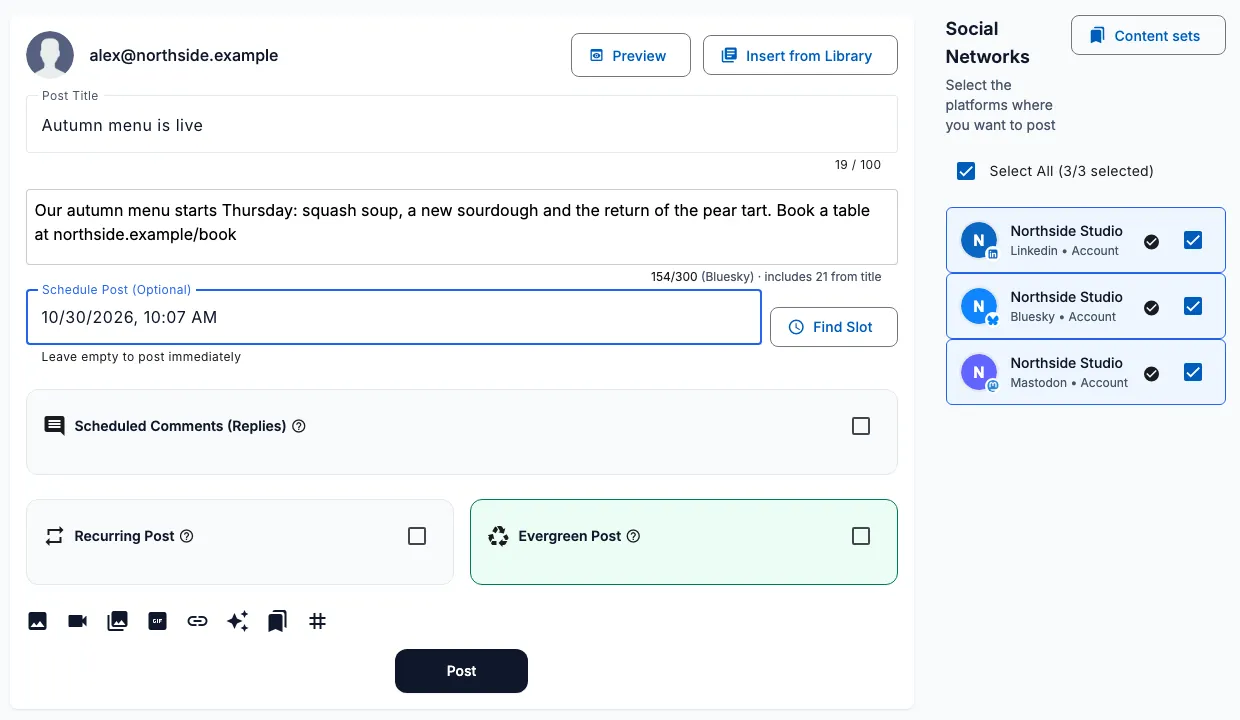
Schedule posts on multiple platforms from one place
One post can go to several accounts, and each account can carry its own version of the text. Different networks suit different lengths and tones, so a short post for one platform does not have to be the same as the longer one for another.
When you generate content with AI for several platforms, the composer keeps each platform version and sends it to the matching account.
These are the platforms you can connect and schedule to today, grouped by type.
| Type | Platforms |
|---|---|
| Social networks | Facebook, Instagram, LinkedIn, X (Twitter), Threads, Bluesky, Mastodon, Reddit |
| Blogging and publishing | Tumblr, Medium, Dev.to, Hashnode, WordPress |
| Video | YouTube |
| Visual discovery | |
| Community and messaging | Discord, Slack, Telegram |
Some platforms need extra fields, for example a title for a video or a blog post. The composer shows those fields only when you select an account that needs them.
Schedule in your workspace timezone
Each workspace has a scheduling timezone setting. Scheduled times are read in that timezone, so everyone on the team picks times on the same clock. If you leave it on the browser default, each person schedules in their own local time.
The time picker shows which timezone applies, so you can check it before you save.
Find the next free slot
Not sure when to post? Select an account and press Find Slot. SocialPatra fills in the next available time based on the posting times set for that account, using the first account you selected.
If no slot is found you get a message and pick the time yourself. Find Slot suggests one time for one post. It does not build an automatic queue.
A social media calendar you can drag
Scheduled posts appear on a monthly social media calendar. Use the arrows to move between months and see what is planned for each day.
To change the day, drag a post onto another date. It keeps the same time of day in your workspace timezone and only the date changes.
Post statuses
| Status | Meaning |
|---|---|
| Draft | Still being edited, not ready to publish |
| Scheduled | Waiting for its publish time |
| Completed | Published to every selected account |
| Partial | Published on some accounts and failed on others |
| Failed | Failed on all accounts |
| Cancelled | Cancelled by a user |
You can filter your posts by these statuses. For a post that failed or only partly published, a retry action is available from the post list. On a partial post it retries only the platforms that failed.
Frequently asked questions
What is a social media scheduling tool?
A tool that publishes your posts automatically at a time you set in advance, so you do not have to post by hand at each moment.
Can I schedule posts to several platforms at once?
Yes. Select several accounts in the composer and one scheduled post goes to all of them. Each account can have its own version of the text.
Which timezone are scheduled times in?
The scheduling timezone set for your workspace. If none is set, it uses each person's browser timezone.
Can I change the date of a scheduled post?
Yes. Drag the post to another day on the calendar. The time of day stays the same.
Does SocialPatra have an automatic posting queue?
No. You choose the time for each post, and Find Slot can suggest the next free time. For many posts at once, see bulk scheduling.
Try it on your own accounts
No card needed to start.