Social media automation tool
Social media automation means setting up your posting once, a schedule, a feed, a spreadsheet or a repeat, and letting software publish to your accounts at the right time.
Last verified
Plan: Free and up
Most teams do not need more things to post. They need the posting to stop eating their week. Copying the same update into five apps, remembering to publish at 9am, re-sharing the article that did well last spring: that is the work automation removes.
SocialPatra is a social media automation tool for solo creators, small teams and agencies. You write or generate a post once, choose the accounts and the time, and SocialPatra publishes it. Around that core sit the pieces that automate the rest: recurring posts, evergreen rotation, RSS auto-posting, bulk CSV scheduling, AI drafting, approvals and an API.
This page walks through what each one does, how to set the first automation up, and where a human check still belongs.
What social media automation is, and what it is not
Social media automation is software doing the repeatable parts of posting for you: publishing at a time you chose, repeating a post, turning a feed or spreadsheet into scheduled posts, and drafting a first version. It is not a bot that invents a presence for you, and it is not a reason to stop reading your replies.
A useful rule: automate the steps that are the same every time, and keep a person on the steps that need judgment. Publishing time, copying one post to several accounts, and re-sharing an evergreen post are the same every time. Tone, timing around news, and answering comments are not.
| Automate | Keep a person on it |
|---|---|
| Publishing at a set date and time | Posts that react to news or a live event |
| Posting the same update to several accounts | Replies and conversations with your audience |
| Re-running evergreen posts and weekly reminders | Sensitive announcements and anything a client must approve |
| Turning new blog articles into posts | The final read of AI drafts before they go out |
What you can automate with SocialPatra
Social media automation is a set of small automations, not one switch. Each one removes a different kind of repetitive work, and you can turn on only the ones that fit how you post.
| What you want to automate | How SocialPatra does it | Read more |
|---|---|---|
| Publishing at a set time | Write once, choose accounts, pick a date and time. The post publishes on its own. | Social media scheduling |
| Repeating a post | Publish the same post every day, week or month until the end date you set. | Recurring posts |
| Posting new blog or news items | Read an RSS feed on a schedule and turn each new item into a post. | RSS auto-posting |
| Scheduling a whole month at once | Upload a CSV, review every row, and create all the valid posts in one step. | Bulk scheduling |
| Writing first drafts | Start from an idea, pasted text or a link and get an editable draft for each account. | AI content |
| Sign-off before publishing | Hold posts as drafts until a reviewer approves, rejects or asks for changes. | Approval workflow |
How to automate your social media in five steps
- Connect your accounts. Sign in and connect the accounts you post to. SocialPatra supports 18 platforms, from Instagram and LinkedIn to Mastodon, Medium and Discord.
- Write one post, or let AI draft it. Type the post in the composer, or give AI Studio an idea, some text or a link and edit the draft it writes for each account.
- Pick the accounts and a time. Tick every account that should get the post. Choose a date and time in your workspace timezone, or press Find Slot to take the next free posting time for an account.
- Add a repeat if the post should run again. Switch on a recurring post and choose daily, weekly or monthly, with an optional end date. You can pause or stop it later.
- Check the calendar. Scheduled posts appear on a monthly calendar. Drag a post to another day and it keeps its time of day.
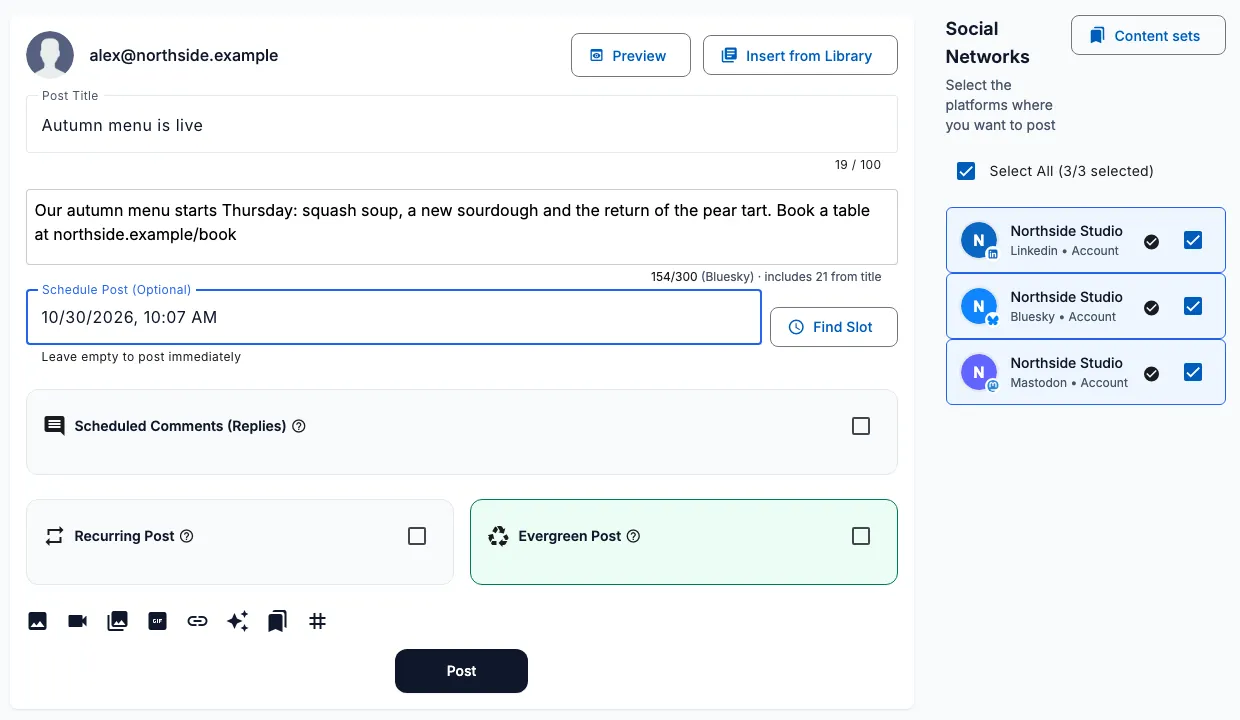
Automate posts that should run again
Some posts earn a second life. A weekly tip, a Monday reminder, a link to the guide people keep asking about. Rewriting and rescheduling them by hand is exactly the kind of chore worth automating.
Recurring posts publish on a pattern you choose: every day, every week or every month. Set an end date if the run should stop on its own, pause it while you are away, and see every copy that was published.
Evergreen rotation goes one step further. Keep your best posts in a reusable library and let SocialPatra cycle through them, so a good post keeps working without you remembering it exists.
Turn blogs and feeds into social posts automatically
If you publish articles, RSS auto-posting is the highest-value automation you can switch on. Add the feed URL, test it to see the latest items, choose the accounts that should receive the posts and decide whether each one is saved as a draft or published on its own.
You stay in control of what goes out. Posting windows limit auto-publishing to the days and hours you pick, include and exclude keywords filter items, and SocialPatra remembers every item it has handled, so a re-dated article is not posted twice.
Each post is shortened at a word boundary to fit the account it goes to, so one feed can feed a short network and a longer one without manual edits.
Plan a month in one sitting with bulk upload and AI
Bulk scheduling turns a spreadsheet into scheduled posts. Download the CSV template, fill in one row per post, upload it and review the validation result before anything is created. Choose Skip Invalid to create only the good rows, and find past uploads in the bulk history.
AI Studio fills the spreadsheet faster. Describe an idea, paste a paragraph or drop a link, and it writes an editable draft for each account you pick. AI is available on every plan: Free includes a small monthly allowance and branded output, and the paid plans add more writing and image credits.
Describe your brand voice once in the AI Studio settings and it is applied to the drafts written for your workspace.
Automation with a human check where you want one
Automation should not mean publishing things nobody looked at. SocialPatra lets you choose the level of control per workflow.
Feeds can save every new item as a draft for you to review, or publish on their own once you trust the source.
For teams and agencies, the approval workflow holds a post as a draft until someone with approval rights approves it, rejects it with a reason or asks for changes. Approvers are notified in the app and by email, and a client can be invited as an approver to sign off without being able to edit your calendar.
Automate from code or from an AI assistant
If your content already lives in a script, a CMS or a release pipeline, SocialPatra has a developer API for scheduling posts from code, and an MCP server so an assistant such as Claude can draft, schedule and report on posts in your workspace after you approve what it may do.
The API and the MCP server are included on the paid plans.
How to choose a social media automation tool
Whatever tool you pick, test it against the work you do every week. These are the questions that separate a scheduler from an automation tool, and how SocialPatra answers each.
| Ask this | In SocialPatra |
|---|---|
| Does it cover the accounts you use? | 18 platforms, from Instagram and LinkedIn to Mastodon, Medium and Discord |
| Can a post repeat on its own? | Daily, weekly or monthly recurring posts with an end date |
| Can it post from your blog? | RSS auto-posting, as drafts or published automatically |
| Can you load many posts at once? | CSV bulk upload with row-by-row validation |
| Does AI help without taking over? | Editable AI drafts per account, on every plan |
| Can someone approve before it goes live? | Approval workflow with approver roles |
| Can it run from code or an assistant? | Developer API and an MCP server on paid plans |
| What does it cost to try? | A free plan with core scheduling, no credit card |
If you run client accounts, also see social media management for agencies, and if you are choosing between tools, the comparison pages show how SocialPatra lines up on features and price.
Platforms you can automate
These are the 18 platforms you can connect and publish to today. One post can go to several of them at once, and each account can carry its own version of the text.
| Platform | Type |
|---|---|
| Social network | |
| Social network | |
| Social network | |
| X (Twitter) | Social network |
| Threads | Social network |
| Bluesky | Social network |
| Mastodon | Social network |
| Social network and community | |
| YouTube | Video |
| Visual discovery | |
| Tumblr | Blogging |
| Medium | Blogging |
| Dev.to | Developer blogging |
| Hashnode | Developer blogging |
| WordPress | Blogging |
| Discord | Community and messaging |
| Slack | Community and messaging |
| Telegram | Community and messaging |
Start automating on the Free plan
There is a free plan with core scheduling, and no credit card is needed to start. Connect an account, schedule your first post, and add recurring posts, feeds or bulk upload as your workflow grows. The pricing page shows what each plan includes.
Frequently asked questions
How do I automate social media posts?
Connect your accounts, write a post or draft it with AI, pick the accounts and a time, and add a repeat if it should run again. For a blog, add its RSS feed; for a month of content, upload a CSV.
What should I not automate on social media?
Keep a person on replies, news-driven posts and sensitive announcements. Automate the steps that are the same every time: publishing time, cross-posting and evergreen re-shares.
What is social media automation?
Social media automation is using software to publish and manage posts without doing each step by hand. In SocialPatra that covers scheduling, recurring posts, RSS auto-posting, bulk CSV upload, AI drafting and approvals.
Is social media automation safe for my accounts?
Posts publish only to the accounts you connect, through the connection you authorize. You also choose whether feeds and AI drafts are reviewed before anything goes out.
Can I automate posts to several platforms at the same time?
Yes. One post can go to every account you tick, across the 18 supported platforms, and each account can carry its own text version.
Can I automate posting from my blog?
Yes. Add your blog’s RSS feed, test it, choose the accounts and decide between saving each new item as a draft or auto-publishing it. Posting windows, keyword filters and duplicate detection keep it tidy.
Does automation mean I lose control of what is published?
No. You can keep feeds on draft, require approval before posts are scheduled, and edit or pause any scheduled or recurring post.
Is there a free social media automation tool?
SocialPatra has a free plan with core scheduling and no credit card required. Recurring posts, bulk upload, RSS and AI have their own plan availability, shown on the pricing page.
Try it on your own accounts
No card needed to start.