Recurring social media posts
A recurring post is a post that SocialPatra publishes again on a schedule you pick: every day, every week or every month.
Plan: Professional and up
You write the post once and choose how often it repeats. Each time it is due, SocialPatra creates a new copy that goes to the same accounts as the original.
It suits content that stays true: opening hours, a weekly offer, a monthly reminder, a link to a guide that is always useful.
How to set up a recurring post
- Write the post. Open the composer, write the post and choose the accounts it should go to.
- Turn on Recurring Post. Switch on the Recurring Post option, then pick a pattern: daily, weekly or monthly.
- Optionally set an end date. Without an end date the post keeps repeating until you stop it.
- Schedule it. Save the post. The first publish happens as you scheduled it; the repeats follow the pattern you chose.
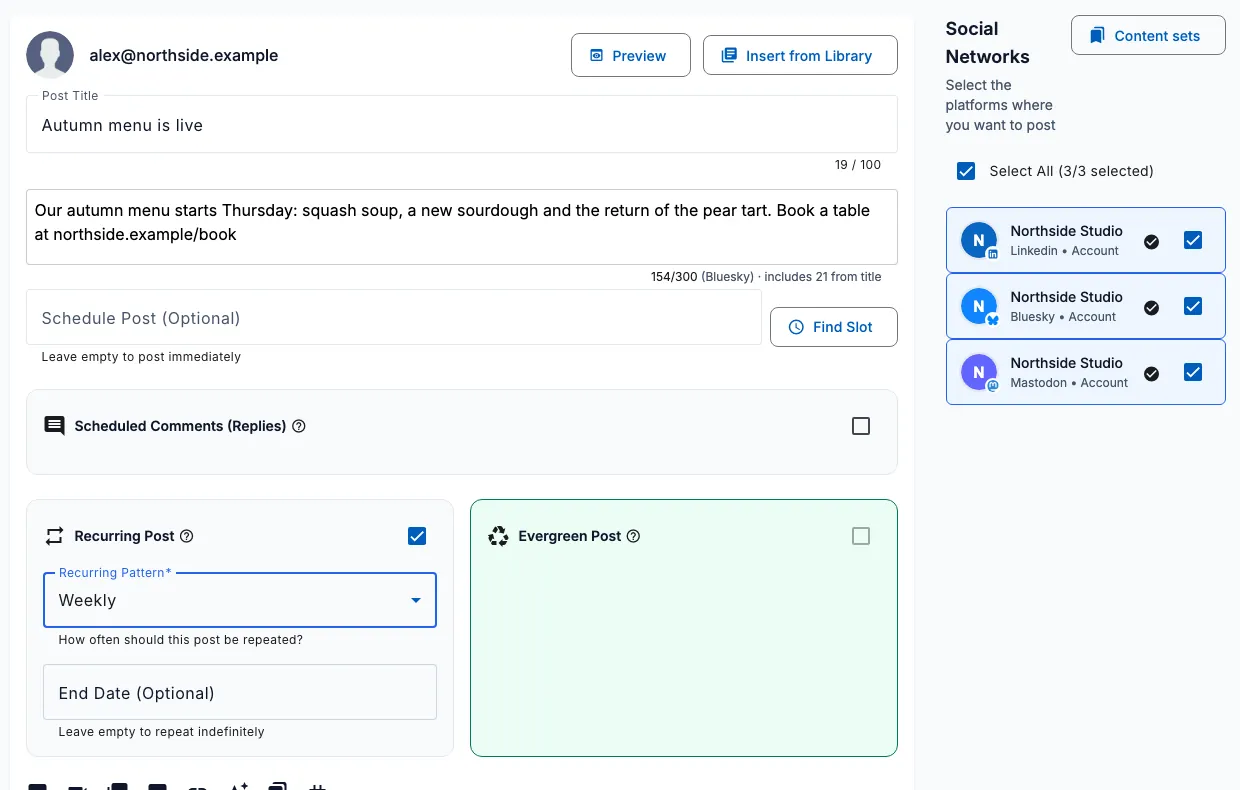
Daily, weekly and monthly patterns
| Pattern | Repeats | Good for |
|---|---|---|
| Daily | Every day | Tips, quotes, daily offers |
| Weekly | Every 7 days | Weekly roundups, class times, recurring events |
| Monthly | Every month, on the same day | Monthly reminders, evergreen guides |
If a month is shorter than the day you started on, the monthly post goes out on the last day of that month. A post started on the 31st publishes on the 28th or 29th in February, not in March.
Writing a post that repeats well
Each copy is the same as the original, so write for the long run. Leave out dates, countdowns and anything that will be wrong in a month.
Keep the wording plain and the link current. If the offer or the page changes, edit the post so the next copies are correct.
A weekly or monthly rhythm is easier for readers to notice than a daily one. Start with the pattern you can keep up.
Pause, stop and restart
Every recurring post lives on the Recurring page of your workspace, filtered as active, paused, stopped or expired.
- Pause a post to hold its repeats, then resume it when you are ready.
- Stop a post right away, which also cancels the next copy that is waiting to publish, or stop it after the current cycle.
- Restart a stopped or expired post, with a new end date if you want one.
What happens when something changes
SocialPatra checks for due recurring posts every hour, so a copy is created close to the time of day you chose.
If a check is missed, for example during maintenance, SocialPatra publishes only the most recent copy that was due. It does not send a burst of old ones.
- If none of the accounts a post targets are connected any more, the recurring post is paused and you get a notification. Reconnect an account and resume it.
- If the post has more media than a connected platform allows, it is paused with a notification explaining the limit. Edit the post to fit, then resume.
- If your workspace turned on post approval after the recurring post was approved, new copies wait for approval as drafts instead of publishing on their own.
- TikTok posts are published by hand from the composer, so a recurring post that only targets TikTok is paused.
See every copy that was published
The original post stays as the rule. Each copy it creates is a normal post you can open, so you can check what went out and when. A copy does not repeat on its own; only the original does.
A post is either recurring or evergreen. If you want older posts to come back without a fixed schedule, use evergreen recycling instead.
Frequently asked questions
What is a recurring social media post?
A post you write once that is published again automatically on a daily, weekly or monthly schedule until you stop it or it reaches its end date.
Can I stop a recurring post?
Yes. You can pause it, stop it immediately, or stop it after the current cycle. A stopped post can be restarted later.
Do recurring posts need an end date?
No. The end date is optional. Without one the post repeats until you stop it.
Which plan includes recurring posts?
The plan shown at the top of this page, and every paid plan above it. The pricing page lists what each plan includes.
Try it on your own accounts
No card needed to start.