LinkedIn Automation for B2B: What Works and What Backfires
A practical B2B guide to LinkedIn automation: what to schedule, what to keep personal, and how profile posts, carousels and polls fit into a steady content routine.
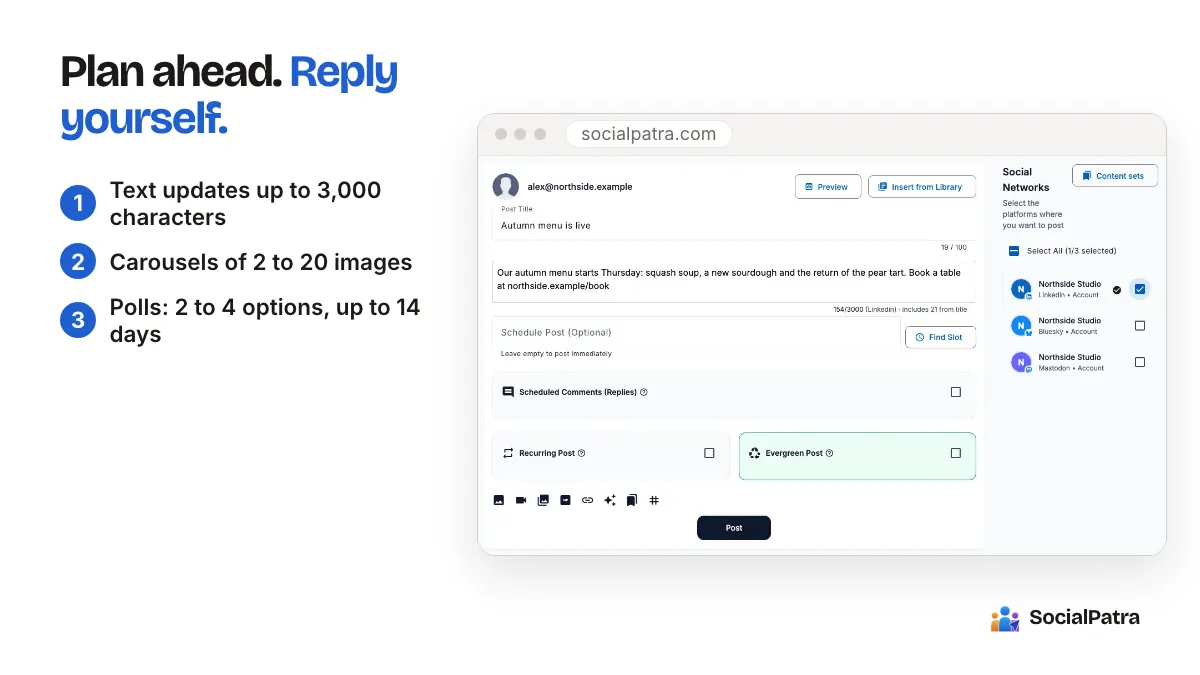
"LinkedIn automation" means two completely different things depending on who says it. To a lead-gen agency it often means software that sends connection requests and messages in bulk. To a founder or marketer it means scheduling their own posts so they appear consistently.
Only one of those tends to build a B2B pipeline you want to keep. This guide is about that one.
The difference that matters
B2B buying is built on trust. People hire vendors they have seen being sensible in public for months. Automation that supports that process helps. Automation that fakes it hurts.
Helpful automation (scheduling your own posts, saving drafts, repurposing your content, tracking what works).
Risky automation (mass connection requests, templated direct messages to strangers, auto-commenting under other people's posts). These are the things LinkedIn restricts accounts for, and they also tend to annoy exactly the buyers you want. If a prospect receives an obviously automated "I loved your post on..." message, you have spent trust to save a minute.
SocialPatra sits firmly on the first side. It publishes your content on a schedule and helps you manage replies, so your reputation stays yours.
What SocialPatra supports on LinkedIn
- Personal profile posting. You connect your own profile and post as yourself.
- Plan ahead. Drafts and time slots keep your presence steady without living in the app.
For profile posts, you can create:
- Text updates, up to 3,000 characters
- Single images
- Video
- Link posts
- Carousels of 2 to 20 images
- Polls with 2 to 4 options, running up to 14 days
One rule to remember: a post carries either one video or a set of images, not both.
Why a personal profile matters more than you think
For many B2B businesses, the founder's or the salesperson's profile gets more attention than the Company Page. People like hearing from people. If your goal is conversations with buyers, scheduling consistent posts on a real profile is often the best first move, and it is exactly what SocialPatra is built for.
A practical approach for a small B2B team:
- The founder posts two or three times a week from their own profile.
- A sales lead posts once a week about what customers ask.
- Everyone replies to comments on their own posts themselves.
Posting consistently from several real people beats a single polished page that nobody follows.
Content that earns attention in B2B
You do not need viral content. You need useful content, repeatedly. Some formats that tend to suit B2B feeds:
- Carousels that explain a process step by step. They are easy to skim and easy to save.
- Short text posts that share one lesson from a recent project, with specifics.
- Polls that ask your audience a real question. Use the answers to guide your next piece of content.
- Short videos where you explain one thing in under a minute.
- Link posts to your own articles, with a sentence about why it matters.
Avoid posting only about your product. A useful ratio is mostly lessons and opinions, with a few product posts in between. For more on mixing automation and a human voice, read how to automate without losing authenticity.
A weekly routine that takes about an hour
- Pick two or three topics from questions customers actually asked this week.
- Draft the posts in one sitting. Start with the hook line, since LinkedIn shows only the first lines before a "see more" cut.
- Add a carousel or poll to at least one of them.
- Schedule them on days when your audience is working. For most B2B audiences that means weekday mornings, but test it and look at your own results rather than trusting a generic rule. Time slots let you set that rhythm once.
- Reply to comments yourself. The social inbox collects them so you can respond quickly. The conversation under a post is where B2B relationships often begin.
- Review once a week. Which posts earned comments from the right people? Post analytics help you see that.
Using AI help without sounding like a robot
Drafting is where many B2B people get stuck. The AI content generator can produce a first draft from a prompt, a block of text, or a URL. Treat it as a starting point. Add a specific example, a real number from your own work, or a stance, because readers can tell when a post has none of those. Our guide to AI ideas, captions and hashtags goes further.
For agencies running client LinkedIn accounts
If you manage LinkedIn for clients, keep each client in its own workspace so profiles, drafts and schedules never cross. If a client needs to approve posts first, that fits an approval step in the workflow before anything goes live. Agency workspaces explains the setup.
A simple month of B2B posts
If you want a starting shape, here is one for a small B2B company, built from four post types you can schedule today:
- Week one: a carousel that walks through how your service works, plus a short text post about a mistake customers often make.
- Week two: a poll asking your audience which problem costs them the most time, plus a link post to a useful article of yours.
- Week three: a short video answering a question from a recent sales call, plus a text post sharing what you learned from the poll results.
- Week four: a carousel built around the most popular theme so far, plus one post that plainly says what you offer and who it is for.
Notice that the product only appears once. The rest earns the right to that post. Adjust the mix after a month based on what your own audience engaged with.
What to skip
- Do not schedule every post at the same time each day. Mix it up a little.
- Do not copy the same text to every platform without checking it. LinkedIn readers expect a different tone than Instagram followers. Posting to several platforms works best when you adjust each one.
- Do not outsource your voice entirely. See what to automate vs post manually.
FAQ
Can I schedule posts to LinkedIn?
Yes. Connect your personal profile and schedule text, images, video, links, carousels and polls, with drafts and time slots to keep a steady rhythm.
Is SocialPatra a safe way to automate LinkedIn?
Yes. It schedules and publishes your own posts and helps you manage comments, which is the helpful side of LinkedIn automation. Your connections and conversations stay yours.
What can I post to a LinkedIn profile?
Text, single images, video, links, carousels of 2 to 20 images, and polls. A post can hold a video or images, not both.
How long can a LinkedIn post be?
Up to 3,000 characters.
Want a steady LinkedIn presence without living in the app? Pick a plan.