Social Media Automation for Local Business and Realtors
A practical guide for local shops, service providers and real estate agents: what to post, what to automate, and how to stay visible without living on your phone.
A local business has an odd advantage and an odd problem. Your customers are a few kilometres away and they trust a face they recognise. But you're also the person who cuts the hair, fixes the pipe or shows the flat, which means social media gets done at 11pm or not at all.
Real estate agents have the same squeeze with higher stakes. Listings go stale quickly, buyers judge you by your profile before they call, and an account that hasn't posted in a month looks like an agent who's gone quiet.
This guide covers what to post, how to automate the repeatable part, and where to stay hands-on. It's built around what SocialPatra actually does for a busy owner.
Where SocialPatra fits
SocialPatra puts your local presence in one place. Connect Facebook, Instagram, Threads, X, LinkedIn, YouTube, Pinterest and more, write once, and publish to all of them. Check the connections page for the current list, since we add platforms over time.
Everything below shows how to turn that into a rhythm that runs without you.
Pick two platforms, not eight
Local reach isn't about being everywhere. Most customers of a bakery, salon or dental practice find you in one or two places. Choose based on where your customers already are:
- Facebook and Instagram suit most local businesses: photos, offers, events, behind-the-scenes, and the page that shows up when someone searches your name.
- YouTube helps if you explain things (a plumber showing how to bleed a radiator, an agent walking a neighbourhood).
- Pinterest works well for home, design, food and weddings, where people plan and save ideas.
- LinkedIn fits professional services, mortgage brokers and commercial property.
Connect those, skip the rest, and revisit in three months.
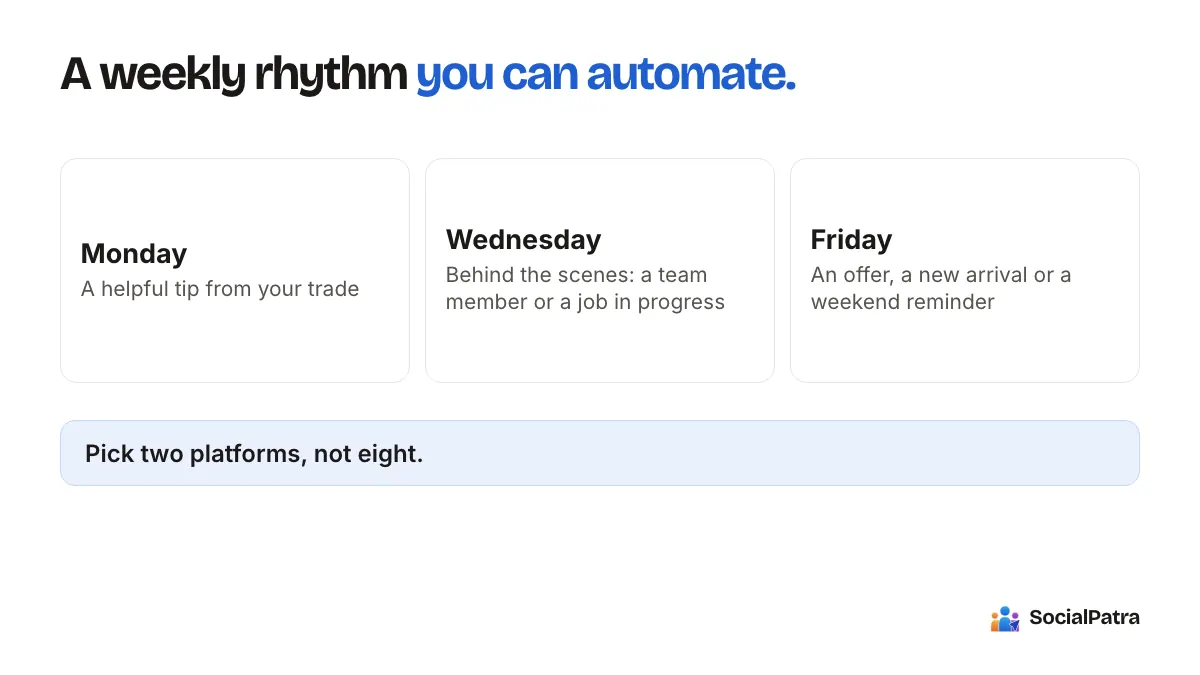
A weekly rhythm you can automate
Consistency matters more than volume. A simple local rhythm, built once and left running:
- Monday: a helpful tip from your trade.
- Wednesday: behind the scenes, a team member or a job in progress.
- Friday: an offer, a new arrival or a weekend reminder.
Three posts a week, scheduled in one sitting. In SocialPatra, set up time slots for each account so the posting times are decided once. Our scheduling guide shows how, including saved posting schedules and time zone handling.
For the weekly slot that never changes, a recurring post repeats daily, weekly or monthly until the end date you set. "Closed Monday" reminders, a monthly "book your service" nudge and a weekly special all fit. Recurring posts are a paid feature, and so are Autopilot and RSS automation. The Free plan includes basic scheduling.
Batch the month
Block one hour a month, write twelve posts, and schedule them. If you plan in a spreadsheet, bulk CSV import accepts up to 100 rows per file. The batching and content library guide goes into the method.
Real estate: a listing workflow
Property posts have a repeatable shape, which is exactly what makes them automatable.
- Photos first. Upload the listing images to the media library. Instagram supports carousels of up to 20 items, so a full walkthrough of rooms fits in one swipeable post.
- Draft the caption from facts. Price, location, bedrooms, one standout feature, one clear action. If you use AI Studio for a first draft, check every number against the listing. AI can't be trusted with your prices or measurements.
- Add a short video. Reels are supported on Instagram and Facebook, and a 30-second walk-through earns more attention than another photo set.
- Schedule a sequence. New listing, open house reminder, and "just reduced" or "sold" updates, each scheduled in advance.
- Save your hashtag sets. Keep one set per neighbourhood and one for general property terms, and add them in one tap. The AI and hashtags guide explains how sets work.
Content beyond listings
Listings alone make a feed that looks like an ad board. Agents who attract inquiries usually mix in neighbourhood guides, market explainers in plain language, buyer or seller FAQs and local events. A short video answering "what does closing cost?" can keep working for months. Evergreen posts help here: after a post publishes, it's republished once, after the number of days you choose, and then stops.
Property agencies and multi-agent offices
Each agent or branch can have its own workspace so accounts, calendars and inboxes stay separate, with team members invited only where they should have access. See agency workspaces for how that works.
Reply fast, and do it as a person
Local customers ask local questions. "Are you open Sunday?" "Is the two-bedroom still available?" "Do you do weddings?" These are hot leads, and the first reply often wins.
The social inbox gathers comments, mentions and messages from your connected accounts into one place, and saved replies let you drop in /hours, /pricing or /available with a keystroke, then personalise before sending. You can assign a question to a colleague. For the full picture, read our guide to replies and monitoring.
Reply to every question about price or availability the same day. That single habit does more for a local business than any posting trick.
What not to automate
- Sold, withdrawn or changed listings. An old post advertising a sold property damages trust. Don't schedule listing posts far ahead without a check.
- Opening hours and holiday notices. Set a reminder to review scheduled posts before public holidays, since changes in your hours make older posts wrong.
- Anything involving legal or regulatory wording. Rules about property advertising, pricing claims and endorsements differ by location. Check yours, and don't rely on AI to know them.
- Personal replies to complaints.
The calendar view helps: drag a post to a new day, or delete it, when plans change.
Keep it light on time
A realistic budget for a one-person business is about two hours a month for batching, then ten minutes a day to answer questions. If you can't spare even that, start with a single platform and a single recurring post, and add from there.
FAQ
Which platforms can a local business connect?
Facebook, Instagram, Threads, X, YouTube, Pinterest, LinkedIn and several other platforms can be connected and scheduled from one place.
How often should a local business post?
Two to four posts a week is a sustainable starting point for most small businesses. The best frequency is the one you can keep up for a year. See our piece on how often to post.
Can I schedule real estate listing posts in advance?
Yes. Upload the images, write the caption, and schedule a sequence. Review scheduled listing posts when a property's status changes, and edit or remove them.
Do I need a paid plan?
The Free plan covers basic scheduling for a small setup. Recurring posts, evergreen reposts, Autopilot, RSS automation, AI tools and analytics are on paid plans.
Want to put your weekly rhythm on autopilot? Pick a plan.
A small team can cover this with social media manager software instead of a full-time hire.