Use n8n, Zapier or Make with SocialPatra
Already building in n8n, Zapier or Make? Let them handle the trigger and let SocialPatra handle the posting, with a calendar, approvals and analytics included.
If you already run workflows in n8n, Zapier or Make, you know the pull of adding one more step: a new product goes live, a podcast episode publishes, a form comes in, and a social post should follow. The question is where that post should actually be written, queued and published.
Our answer: keep the trigger in your workflow tool and hand the posting to SocialPatra. You get the flexibility of your workflow plus a calendar, drafts, approvals and analytics that you never have to build.
What workflow builders are great at
n8n, Zapier and Make are general workflow builders. You pick a trigger (a new row in a spreadsheet, a new order, a form submission), chain some steps, and the last step does something. They connect many apps without code, which makes them the natural place to detect that something worth posting about just happened.
Typical triggers that pair well with a post:
- A new product goes live in your store and you want an announcement.
- A customer leaves a five-star review and you want to share it, after a human approves it.
- A new podcast episode publishes and you want a post drafted.
- A form submission should alert your team and also post an update.
Why let SocialPatra do the posting
Posting to social networks looks like one step in a diagram. SocialPatra takes the details off your workflow:
- One calendar. Every post, whether it came from a workflow or from a teammate, lives in the same calendar and queue, so you see the whole picture and avoid double-posting.
- Per-network handling. Formats and post types are handled for each connected network on our side, so your workflow stays short.
- A review step. Teammates can approve a post before it goes live, and paid plans can send a webhook when a post is published, fails, or is approved.
- Failures in plain view. You can see what failed and why in one place, and reconnect an account from the app.
- Reporting included. Performance numbers for every platform sit in one analytics view on paid plans.
If your posting is mostly content you write or plan ahead of time, you can skip the workflow entirely. Our guides on scheduling with time slots and bulk CSV import show how little setup a month of content takes. For event-driven posts, combine both: the workflow handles the trigger, SocialPatra handles the posting.
Connect any workflow with the developer API
SocialPatra has a developer API with scoped keys, available on paid plans. A key belongs to one workspace, and you choose exactly which permissions it carries. A reasonable setup for an automated publisher is permission to write posts and upload media, and permission to read connections if the flow needs to look up which accounts exist. A reporting flow gets read access to analytics and nothing else. You can also set an expiry, rate limits, and allowed IPs. Our guide to API keys and automated posting covers the details.
From n8n, Zapier or Make, this usually means one generic HTTP request step with your key, rather than a long chain of network-specific steps. The platform differences stay on our side of the line.
Let an AI assistant drive it
If you use an AI assistant such as Claude, SocialPatra also runs a hosted MCP connector. MCP is a standard that lets an assistant call tools on your behalf. Through it, an assistant can list your connected accounts, check whether any need reconnecting, create or schedule a post, list drafts, check a post's status, pull an analytics summary, and save plans to your content library. Connecting a new social account happens in the web app.
The connector sits behind the same permission scopes as API keys and is also a paid-plan feature. It's a great fit when you want to say "draft three posts from this week's notes and schedule them" without wiring up a workflow at all. Details are on the developers page.
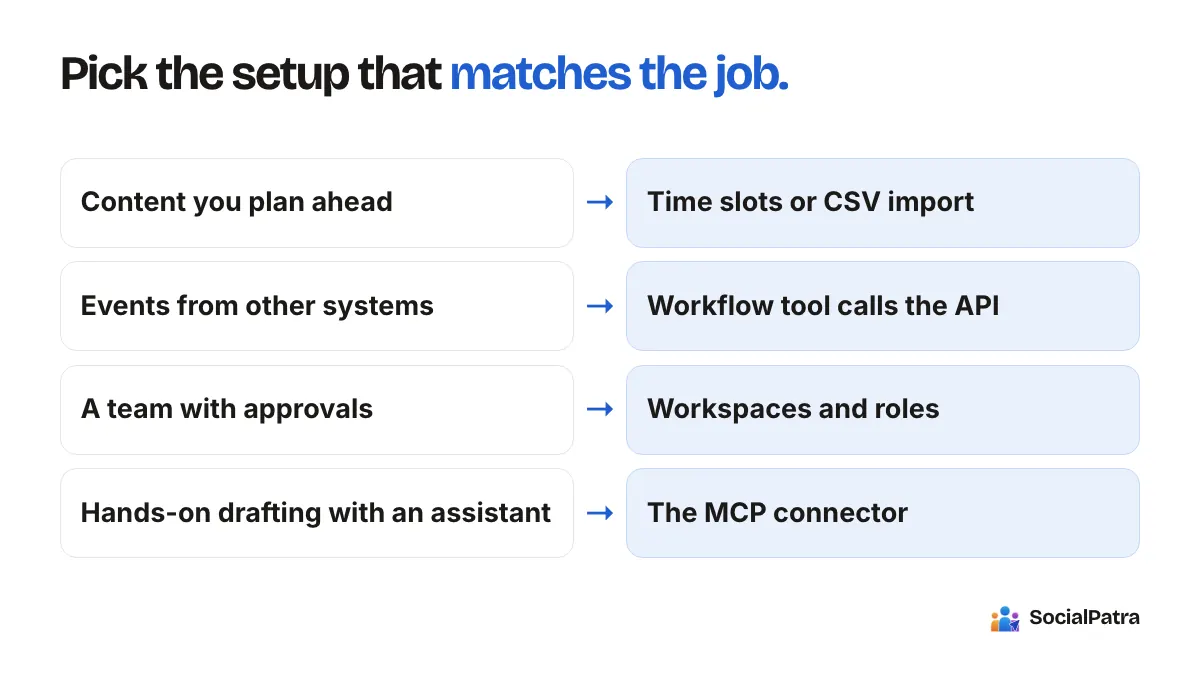
A simple way to choose your setup
- Content you plan ahead: schedule it in SocialPatra with time slots or a CSV import.
- Events from other systems: trigger from your workflow tool and call the SocialPatra API.
- A team that needs one shared queue and approvals: use SocialPatra workspaces and roles.
- Hands-on drafting with an assistant: connect the MCP connector.
What to try first
Spend an hour writing ten posts in SocialPatra before you build anything. Then add one workflow that creates a single draft from a trigger you already have. For a wider view of what to hand off and what to keep human, see what to automate vs post manually and social media automation best practices.
FAQ
Can I connect n8n, Zapier or Make to SocialPatra?
Yes, through the developer API on a paid plan. Create a workspace-scoped key with only the permissions the flow needs, then call it from a generic HTTP step in your workflow tool.
Do I need a workflow tool if I use SocialPatra?
Only if you want events from other systems, like a new order or a form submission, to create posts. For planned content, SocialPatra alone is enough.
Can I limit what an API key can do?
Yes. Each key belongs to one workspace and carries only the permissions you choose. You can also set an expiry, rate limits, and allowed IPs.
What does MCP add over the API?
MCP lets an AI assistant use SocialPatra directly through a conversation. The API is the natural fit for jobs that run on a trigger.
Pick a plan and put your workflows and your posting in one place. API and MCP access arrive with paid plans.