Instagram Automation: What's Safe and What Gets You Banned
Scheduling Instagram posts and automating engagement are very different things. Here is where the safe line sits, what you can automate, and what SocialPatra publishes to Instagram.
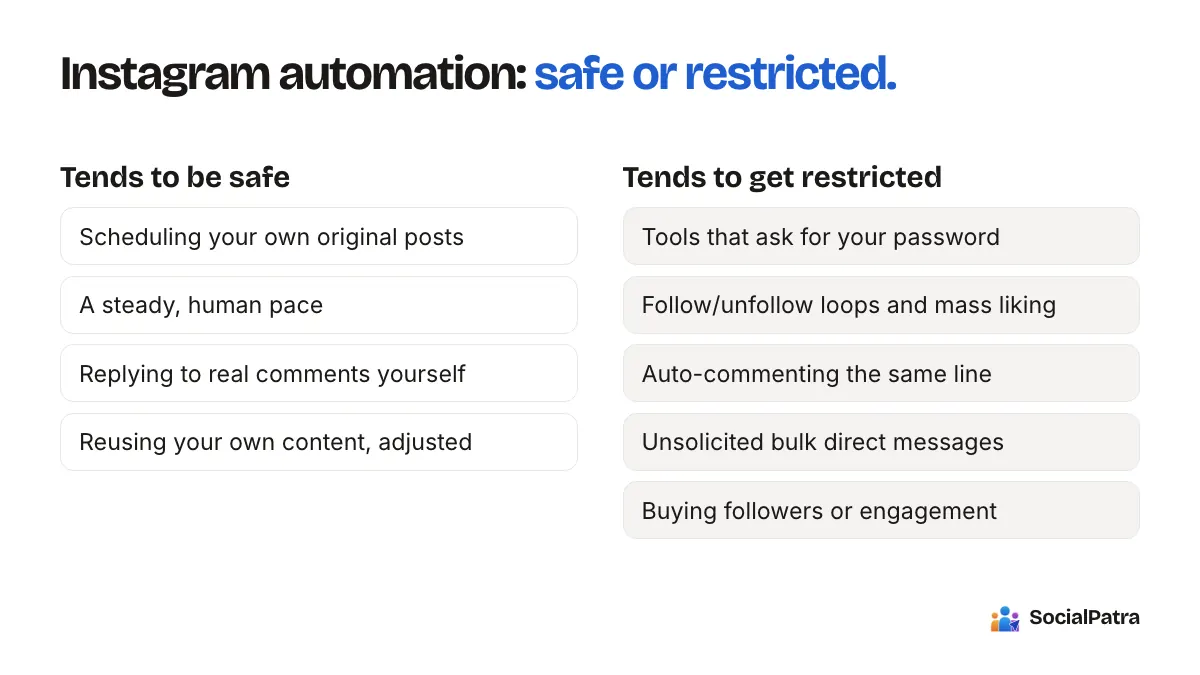
A question that comes up a lot: "I automated my Instagram and got restricted. Is all automation dangerous?" The honest answer is no. But "automation" covers two very different activities, and people who lump them together either avoid useful tools or get burned by risky ones.
This article separates the two, so you can decide what to hand to software and what to keep human.
Two kinds of "Instagram automation"
Publishing automation means your content goes out on a schedule. You write the caption, attach the image or video, pick a time, and a tool posts it for you. You could have done the same thing by hand at that time. You just did not have to be there.
Engagement automation means software pretends to be you in other people's spaces. It follows accounts, likes posts, leaves comments, or sends direct messages in bulk, usually using your login credentials or a simulated app session.
These are not equally risky. Instagram's own platform exists to let approved tools publish content to professional accounts on a user's behalf, with the account owner granting permission through Instagram's normal login screen. Nothing in that route involves handing over your password to a stranger.
Bulk following, mass liking and copy-paste commenting are the things Instagram has consistently tried to suppress, because they exist to manufacture attention that was not earned.
What tends to be safe
No tool can promise you a ban-proof account, and anyone who does is selling something. But these habits are generally low risk:
- Scheduling your own original posts through a tool that connects with the official permission screen.
- Posting at a steady, human pace. One to a few posts a day is normal. Fifty is not.
- Replying to real comments yourself, even if you view them in a shared inbox rather than inside the Instagram app.
- Reviewing your analytics to see what worked.
- Reusing your own content across platforms, adjusted for each place.
What tends to get accounts restricted
- Tools that ask for your Instagram password or log in as you from a server somewhere.
- Follow/unfollow loops and mass liking to "grow" quickly.
- Auto-commenting the same line under dozens of posts.
- Unsolicited bulk direct messages.
- Buying followers or engagement.
- Running several tools that all touch the account at once, which creates odd activity patterns.
If a growth service says it will "get you 1,000 followers a month on autopilot", that service is almost certainly doing one or more things from this list. The followers it brings also tend not to care about your content, so the numbers go up and the results do not.
Can you automate Instagram and still grow?
Yes, if you automate the boring part and keep the human part.
Growth on Instagram mostly comes from consistent posting, content people want to save and share, and real conversations. Scheduling helps with the first. It does not replace the other two. If you want to go deeper on that balance, see what to automate vs post manually and how to automate without losing authenticity.
A realistic week for a solo creator might look like this. On Sunday you write and schedule five posts. During the week you spend ten minutes a day replying to comments. At the end of the week you check which post got the most saves and make more of that. The software does the clock-watching. You do the part that gets you noticed.
What SocialPatra can publish to Instagram
SocialPatra connects to Instagram Business accounts. The post types you can create for Instagram are:
- Single image posts
- Videos
- Reels
- Carousels, from 2 up to 20 items, and you can mix images and videos in one carousel
- Stories, one image or one video per Story
A few details worth knowing before you plan your week:
- Every Instagram post needs media. A text-only post is not possible on Instagram, so the composer will not let you send one.
- Captions can be up to 2,200 characters.
- A Story holds exactly one item. If you want a three-frame Story sequence, schedule three Stories.
- A Reel needs a video, not a still image.
Stories and Reels are a common point of confusion. Yes, you can schedule both. No, there is no trick involved: you pick the post type in the composer, attach the media, and choose a time.
You can also see the comments on your Instagram posts in the social inbox and reply from there, which keeps the engagement human while saving you the app-switching. And post analytics show what is actually working.
A safe Instagram routine in about an hour a week
- Plan the week. Pick three to five posts. Mix formats: one carousel, one Reel, a couple of single images.
- Write and schedule them in one sitting. Use time slots so you are not choosing a time for every post.
- Add Stories separately. Stories are short-lived, so schedule them a day or two ahead.
- Reply to comments daily. Use the inbox so it takes minutes.
- Review on Friday. Look at what earned saves and replies, then adjust next week's plan.
If you run client accounts, keep each client in its own workspace so connections and schedules never mix. Agency workspaces cover how that works.
A word on "just in case" automation
Some people reach for aggressive tools out of fear that they are falling behind. Posting more is rarely the fix. A consistent, honest account usually beats a loud, risky one. The accounts that get into trouble are most often the ones that treated Instagram like a numbers game.
FAQ
Is it safe to schedule Instagram posts with a third-party tool?
Scheduling through a tool that connects via Instagram's official permission screen is a normal, supported way to post. It is a different thing from tools that ask for your password or perform likes, follows and comments automatically. Nobody can guarantee that an account will never be restricted, so keep your activity human-paced and follow Instagram's rules.
Can I schedule Instagram Stories and Reels?
Yes. SocialPatra supports Reels (video) and Stories (one image or one video each), along with single images, videos and carousels of up to 20 items.
Is SocialPatra safe for my Instagram account?
SocialPatra is built for the safe side: publishing and managing your own content, plus reading and replying to comments yourself. Every follow, like and comment stays genuinely yours.
Do I need a personal or a business Instagram account?
SocialPatra connects to Instagram Business accounts. If your account is a personal one, switch it to a Business account in Instagram's settings first.
Ready to put the posting on a schedule and keep the conversations yours? Pick a plan.