Social Media Management for Agencies With Many Clients
How an agency runs many client accounts in SocialPatra: one workspace per client, client connect links, client approval, white-label branding, batch scheduling, per-client reports and the Agency plan price.
By SocialPatra Team · Last updated 18 November 2026
SocialPatra gives every client its own workspace, lets clients connect their own accounts from a link without a login, and can hold every post for the client's approval. The Agency plan costs $99 or ₹7,999 a month and includes 10 social accounts across all clients and two team members besides the owner. Extra accounts are $4 or ₹249.
Which social media tool fits an agency with many clients?
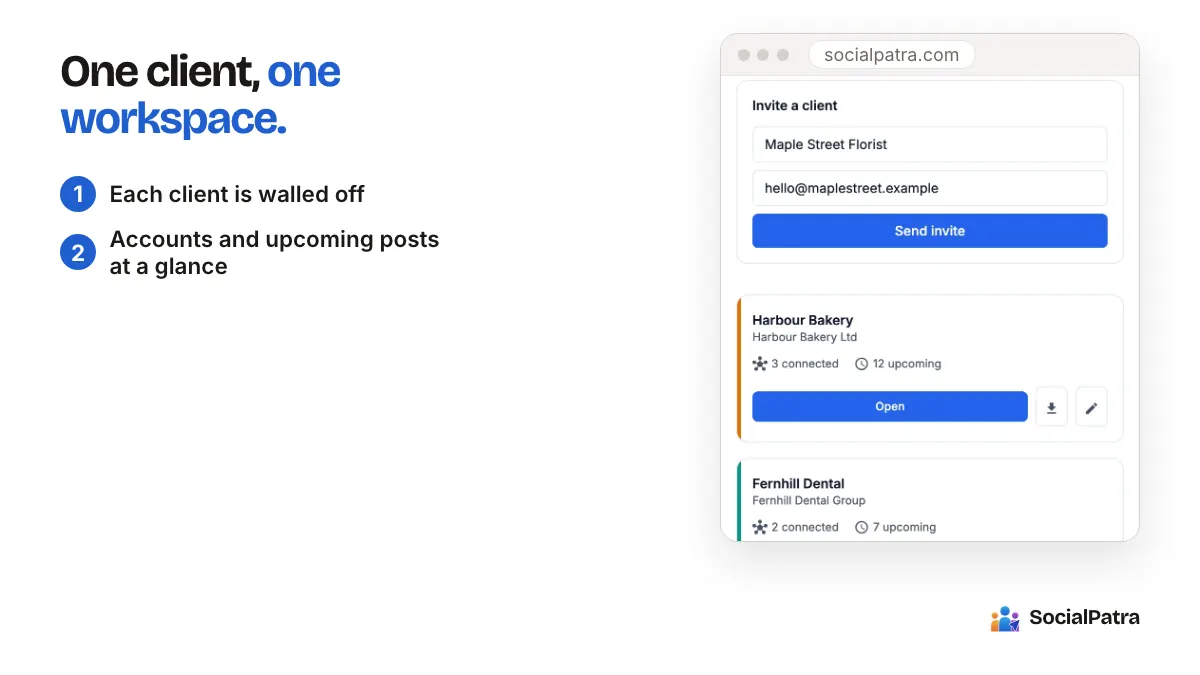
One that keeps each client in its own workspace, lets clients connect their own accounts, holds posts for the client's approval and reports per client. SocialPatra's Agency plan does all four from one Agency page that lists every client with a label, a colour and the number of connected accounts.
How does SocialPatra keep clients separate?
Every client gets its own workspace. Posts, connected accounts, drafts, the inbox and analytics stay inside that workspace and never mix with another client's. Teammates see only the workspaces they are invited to. Each workspace keeps its own scheduling timezone, which matters when a client is in another country.
How do clients connect their own accounts?
You add the client on the Agency page and send a connect link by email. The client opens it and connects their own social accounts without creating a SocialPatra login and without sharing a password with you. The link works for 7 days and can be used again to add more accounts while it is valid. You can see pending links and revoke one sent by mistake.
A client who already has a SocialPatra workspace can link it to your agency instead. You agree the access level, and either the agency or the client pays for that workspace.
How does client approval work?
Invite the client as an approver and approval switches on for that client automatically. Every post then waits for the client, including posts your team writes. The approver can view content and analytics and approve, reject or request changes; they cannot create, edit or delete posts, or manage accounts, the team or settings. Approver seats are free.
The client can later switch to trust mode, in which your team publishes without waiting. Switching back to review holds any post that was scheduled but never approved. For a first look without a login, send a client preview link: the client reads the post and comments, and the approver login records the decision.
How do you schedule faster for many clients?
Batch the work inside each client's workspace.
| Task | How |
| A month of posts | Upload a CSV, review every row, create all valid posts in one step (bulk scheduling) |
| Different text per account | One post goes to several accounts with separate text for each |
| Weekly overview | Calendar view; drag a post to another day |
| Mixed channels | 18 platforms: Facebook, Instagram, LinkedIn, X, Threads, Bluesky, Mastodon, Reddit, Tumblr, Medium, Dev.to, Hashnode, WordPress, YouTube, Pinterest, Discord, Slack and Telegram |
| Drafting | AI-assisted drafts, with 1,000 AI text generations a month on the Agency plan |
| AI assistants | Your team can draft and schedule from Claude or ChatGPT through the MCP server, one connection per client workspace |
How do you report to clients?
Each client workspace has its own Analytics page showing how published posts performed, and you can export a date range as a CSV file. From the client's card on the Agency page you can download a PDF report covering the client's 100 most recent published posts.
What does white-label branding cover?
On the Agency plan you can set a brand name, logo and accent colour. With branding on, it appears on the page clients use to connect their accounts, in the emails clients receive, on their PDF reports and in the app header inside the client's workspace, in place of SocialPatra's.
What does the Agency plan cost?
Prices as of 18 November 2026; INR is before 18% GST, USD includes tax. The Agency plan is billed monthly.
| Item | USD | INR (before GST) |
| Agency plan, monthly | $99 | ₹7,999 |
| Social accounts included | 10 across all clients | 10 across all clients |
| Each extra account | $4 a month | ₹249 a month |
| Team members included | 2 besides the owner | 2 besides the owner |
| Each extra team member | $19 a month | ₹1,499 a month |
| Client approver seats | Free | Free |
| Trial | 7 days, with 5 accounts | 7 days, with 5 accounts |
Worked totals: 10 accounts cost $99 or ₹7,999; 25 accounts cost $159 or ₹11,734; 50 accounts cost $259 or ₹17,959 a month.
A freelancer with two or three clients may not need the Agency plan. Professional includes unlimited workspaces, so each client can still have its own, from $5 or ₹399 a month plus $3 or ₹149 per extra account. See pricing.
What does SocialPatra not do for agencies?
- No TikTok publishing. TikTok is not one of the 18 platforms.
- One approval step. Approval is a single review, not a chain of writer, then manager, then client.
- No X during the trial. X posting is on paid plans with a monthly X allowance, and not during a trial.
- Extra team members are billed. Beyond the two included, each team member costs $19 or ₹1,499 a month, viewers included; approver seats and the agency's own console seat stay free.
FAQ
How much does SocialPatra cost for an agency with 25 client accounts?
The Agency plan costs $159 or ₹11,734 a month for 25 accounts: the $99 or ₹7,999 base includes 10 accounts across all clients, and 15 more cost $4 or ₹249 each. INR is before 18% GST. Two team members besides the owner and all client approver seats are included.
Can clients connect their accounts without a SocialPatra login?
Yes. On the Agency plan you send the client a connect link by email. They open it and connect their own social accounts without signing up or sharing a password. The link stays valid for 7 days, can add more accounts while valid, and you can revoke it at any time.
Can a client approve posts before they go live?
Yes. Invite the client as an approver and approval turns on for that client, so every post waits for them, including your team's. The approver can approve, reject or request changes, and approver seats are free. The client can switch to trust mode later.
Does SocialPatra offer white-label for agencies?
Yes, on the Agency plan. With branding on, your name, logo and colour appear on the client connect page, in client emails, on PDF reports and in the app header inside the client's workspace. Inviting clients needs the Agency plan, so these client-facing surfaces come with it.
Who pays for a client's workspace?
The agency pays for the workspaces it creates and manages, including accounts clients connect through its links. When a client links their own existing workspace, the agency and client choose who pays. Agency console seats and client approver seats are never billed.
Read more on the agencies page and the approval workflow page, or pick a plan.
Drafted with AI assistance and checked against the product by the SocialPatra team. Prices as of 18 November 2026.